全部文章
Reviews2026/09/17

LectMate Review 2026: Real Classroom Test

Our hands-on LectMate review 2026 tests transcription, Chinese translation, mind maps, AI Tutor, quizzes, pricing, and the product's limits.

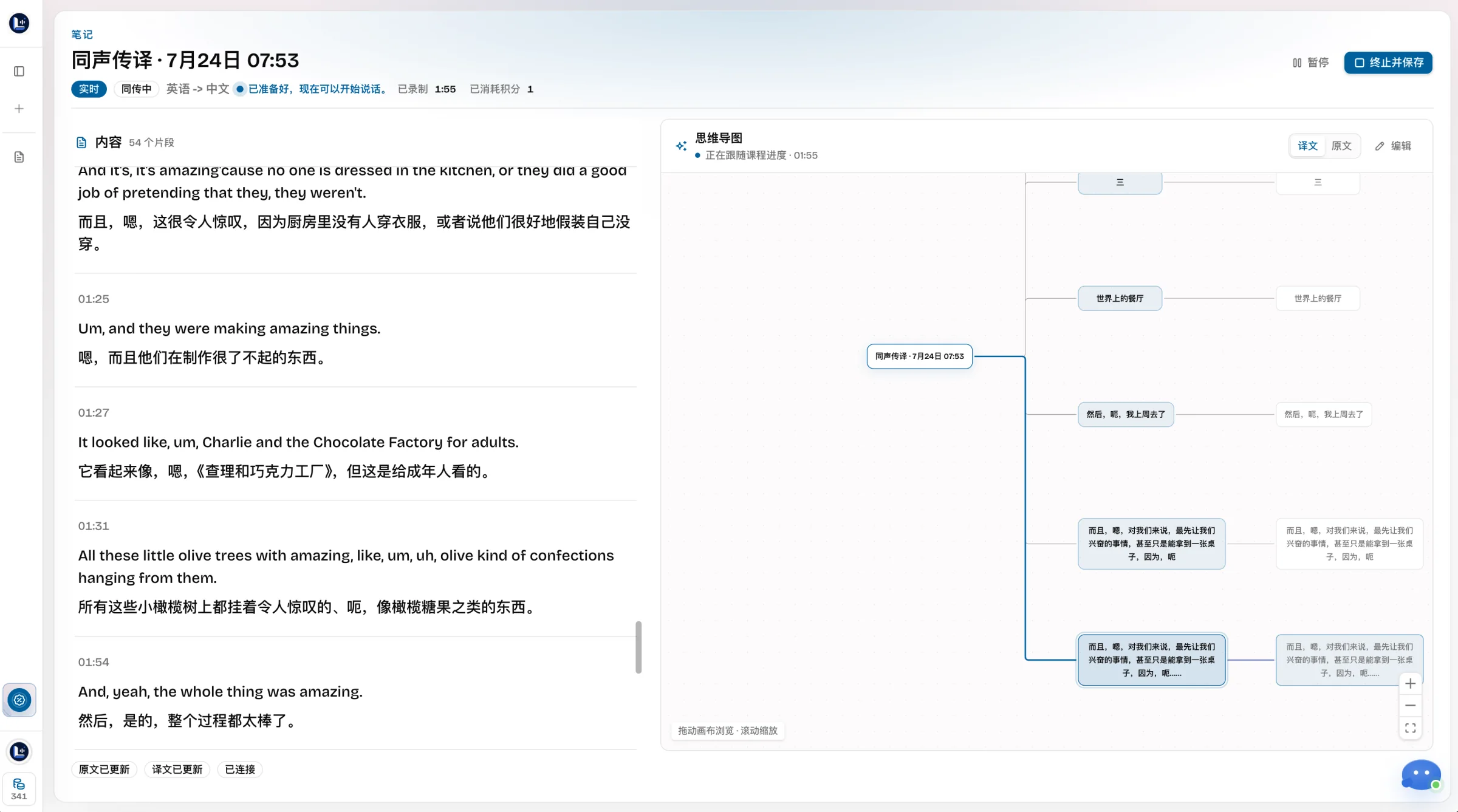
LectMate is built around a demanding idea: make a lecture easier to understand live and easier to study later. This LectMate review 2026 tests that complete loop instead of judging a landing page.

One naming note matters. The browser product shown here now continues as Memo Card. An unrelated mobile app is also called “LectMate: 有道留学听课宝.” This review covers the web workspace in the screenshots, not the Youdao app.

Disclosure: Memo Card publishes this article and operates the web product previously branded LectMate. This is a first-party review, not an independent endorsement. We provide the test input, real screens, limitations, and current pricing for scrutiny.

LectMate review 2026: the short verdict

LectMate is most convincing when you need more than a transcript. In our test, one English recording became a speaker-separated transcript, Chinese translation, source-linked mind map, AI Tutor answers with timestamps, and a five-question quiz. The way LectMate connects every study output to the original audio is the product's best idea.

The trade-off is focus. LectMate is not a document notebook, sales meeting bot, or mature mobile recorder. Its best experience is in a desktop browser, and generated study material still needs checking.

Best forLess suitable for
International students following fast lecturesStudents who work only from a phone
Bilingual English-to-Chinese reviewTeams that mainly need calendar meeting bots
Returning from a summary to the source audioConverting large PDF libraries into flashcards
Building quizzes and questions from one classTreating AI notes as an unquestioned source

LectMate is strongest for live understanding and source-linked revision. It is less compelling if you only want a cheap transcript or broad notebook.

How we ran this hands-on LectMate test

We used the British Council's public 4:01 “A special restaurant” listening sample. It contains two speakers, pauses, fillers, proper names, and long explanations.

We processed English into Chinese and reviewed the transcript, speaker labels, timestamps, replay, mind map, AI Tutor, and quiz. The real session screenshots were captured July 24, 2026; product and pricing were rechecked September 17.

This was a workflow test, not a word-error-rate benchmark. Four minutes of clean audio cannot prove how LectMate performs in a noisy 90-minute seminar.

What using LectMate actually felt like

1. Recording transcription produced a usable review timeline

The recording became 59 timestamped segments with two detected voices. LectMate paired English with Chinese and kept the original audio in a persistent player. A timestamp returned us to the evidence behind a note.

Instead of a transcript wall, LectMate offered a simple path: read, compare, replay, then study without changing tabs.

Real LectMate recording test with English transcript, Chinese translation, two detected speakers, timestamps, and audio replay

Real use image: the 4:01 test produced 59 segments, bilingual text, speaker labels, and an audio timeline. Nothing was composited onto the interface.

The output was useful, not spotless. Fillers remained, speakers had numbers rather than names, and some Chinese sounded literal. Replay is still essential for quotations and specialist terms.

2. The bilingual view reduced context switching

LectMate keeps source and meaning adjacent. “What would you like to talk about?” sat above “你想谈什么?”, and longer statements kept that relationship.

The translation helps a student follow the argument; the source protects names, terminology, and exact wording. Translation-only overlays lose that evidence.

Use LectMate translation for comprehension, then verify anything destined for an essay, lab report, or exam against the timestamped audio.

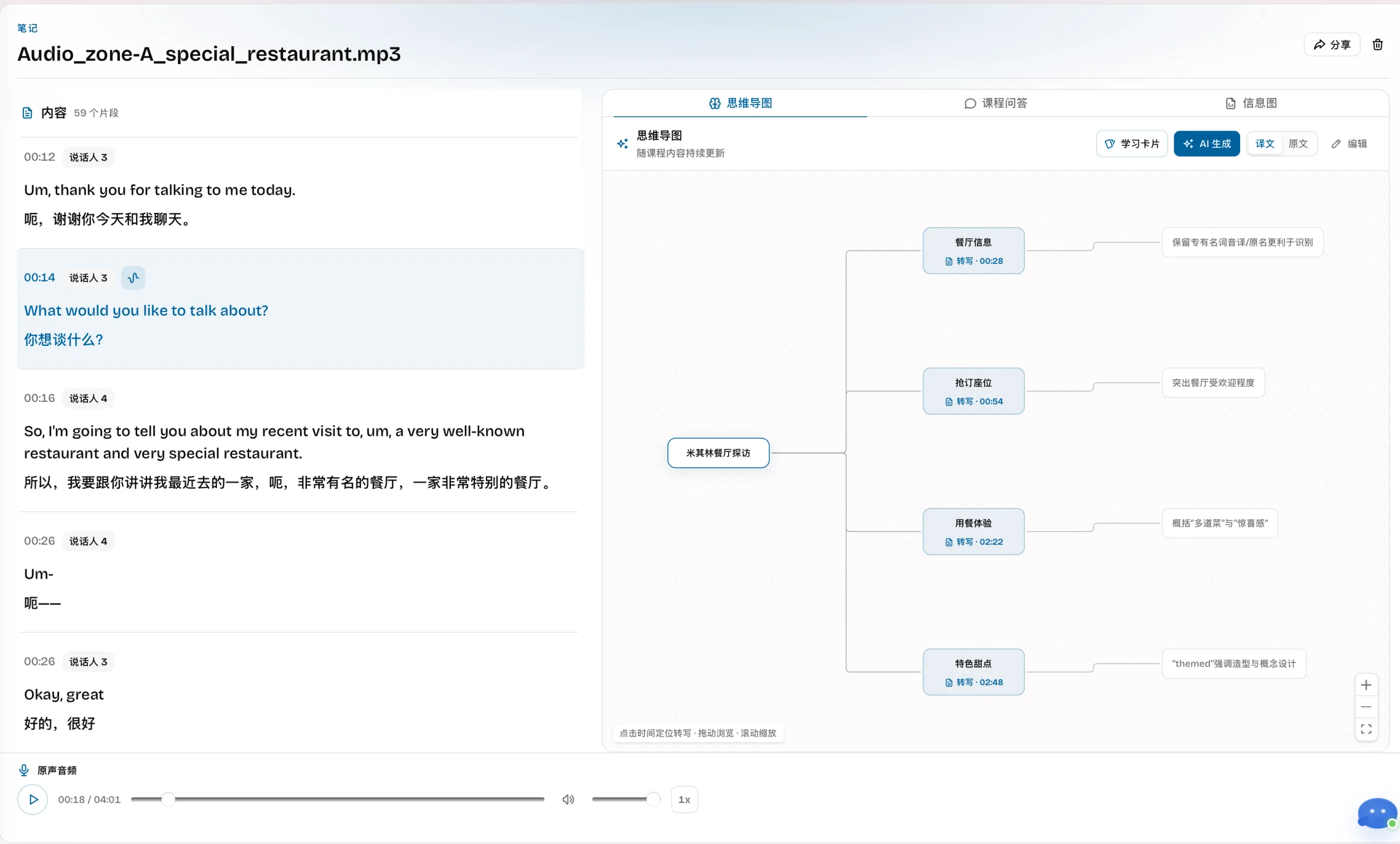
3. The mind map made a linear recording scannable

LectMate mapped the interview into background, reservation, heatwave, kitchen, and dessert branches. Major ideas carried source times rather than floating free of the recording.

Real LectMate mind map generated from the restaurant interview with source timestamps and bilingual transcript beside it

Real use image: mind-map nodes link to source times including 00:28, 00:54, 02:22, and 02:48.

The LectMate map worked as orientation, not final notes. Scan it to find a branch, then verify the branch against the transcript; generated hierarchy can make an informal talk look tidier than it was.

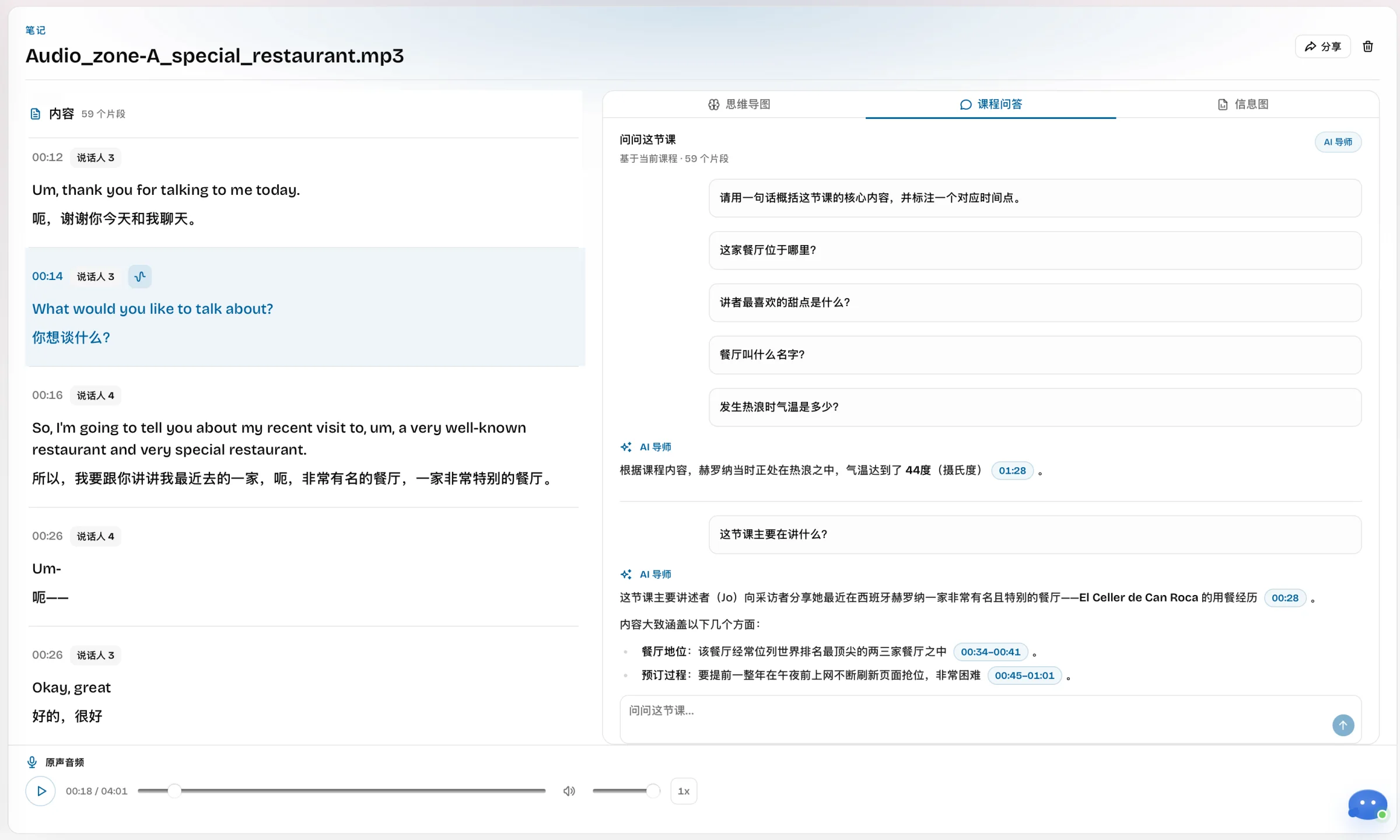
4. AI Tutor answers were strongest when they cited the lecture

The AI Tutor suggested questions and accepted open ones. It answered factual prompts about location, food, and the heatwave. Longer answers cited ranges such as 00:34–00:41 and 01:23–01:33.

Real LectMate AI Tutor answering questions from the tested recording with clickable source timestamps

Real use image: AI Tutor answers cite the tested source instead of presenting an untraceable response.

A timestamp turns an answer into a shortcut back to class. LectMate AI Tutor was useful for retrieval and concise explanation, but it should not invent conclusions beyond the source.

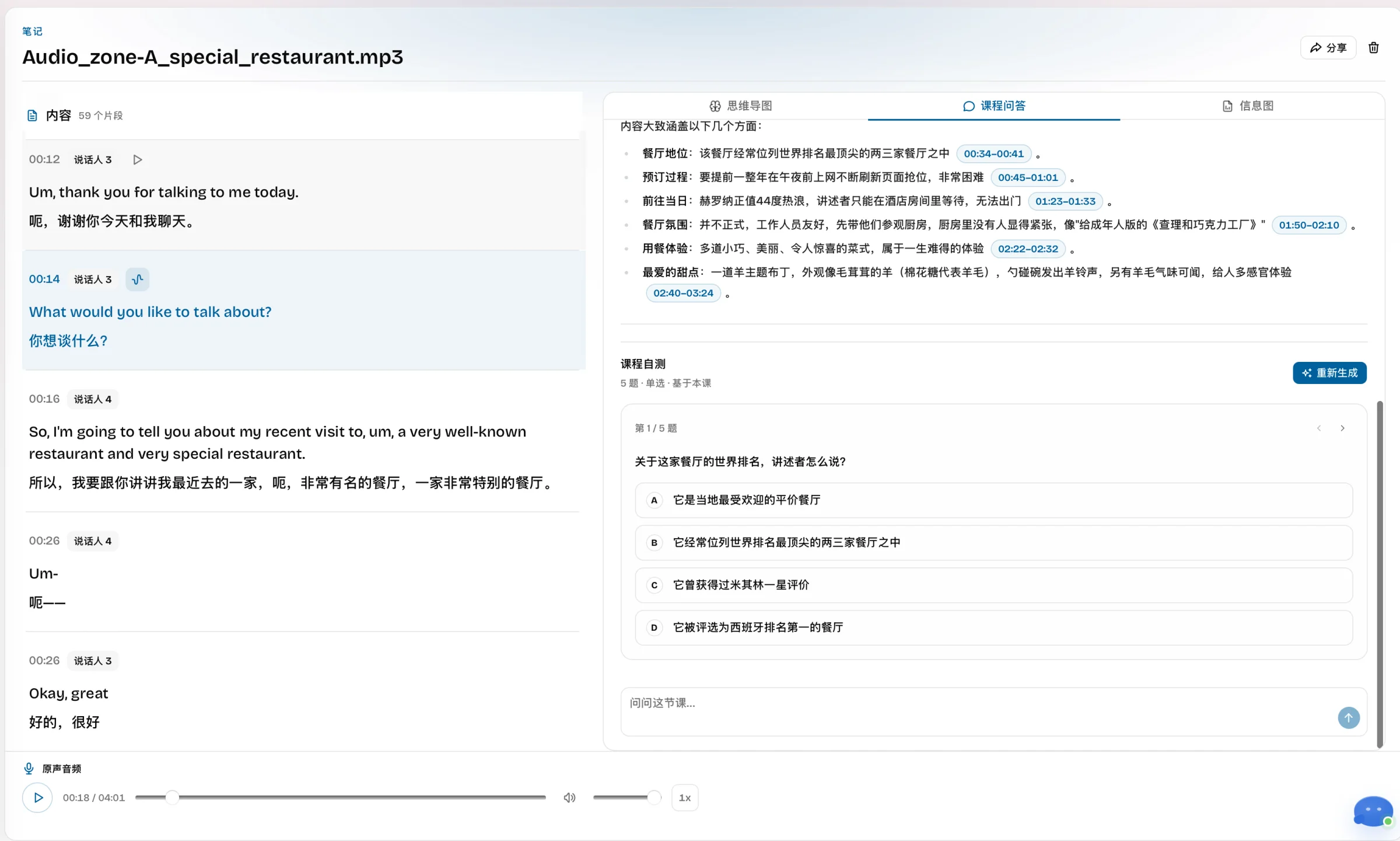
5. The quiz turned review into an active task

LectMate generated five multiple-choice questions. One correctly tested the claim that the restaurant often ranks among the world's top two or three.

Real LectMate course quiz generated from the restaurant interview beside the bilingual transcript

Real use image: the quiz stays beside the transcript and audio for answer checking.

The LectMate quiz required recall, but automated questions can overemphasize memorable facts. Use LectMate for a first practice pass, then add questions around the lecturer's real objectives.

LectMate features that stood out

The LectMate workflow goes beyond transcription:

  • Live transcription: follow spoken English as text during a class.
  • Live bilingual captions: keep source speech and translation in one reading path.
  • Recording upload: process an existing audio or video file with timestamps and speaker separation.
  • Search and replay: return to the exact source moment behind a term or note.
  • Mind map: scan a source-linked structure of the session.
  • AI Tutor: ask questions about the current class and inspect time references.
  • Course quiz: create a short active-recall check from the lecture.
  • Chrome extension: capture one selected browser tab for online classes.

The LectMate Chrome extension captures one selected browser tab. It does not cover native Zoom or every mobile scenario, so test your class setup first.

LectMate pricing in 2026

The web product now publishes pricing under Memo Card. As of September 17, 2026, the current pricing page lists three one-time options:

OptionPublic pricePublished usage
200 credits$29.90About 1,000 recorded minutes, 600 live transcription minutes, or 400 bilingual-caption minutes
2,000 credits$199About 10,000 recorded minutes, 6,000 live transcription minutes, or 4,000 bilingual-caption minutes
Annual Unlimited$299 for one yearUnlimited listed lecture workflows for one year; no automatic renewal

LectMate modes consume credits at different rates. Annual access is a one-time purchase for one year, not an auto-renewing subscription. Estimate the mode you will actually use and verify checkout price and currency.

Privacy, recording permission, and accuracy limits

Lectures can contain classmates' voices or confidential discussion. Get the permission required by your school, participants, and local law before using LectMate.

The privacy policy says session recordings and outputs remain until the user deletes them. The extension captures only the selected tab after the user starts it. Those controls do not replace consent.

Accuracy varies with distance, noise, accents, cross-talk, network quality, and vocabulary. Our clean sample cannot represent a crowded lab. Test LectMate in your real room and language pair first.

LectMate pros and cons

Pros

  • Source text, translation, timestamps, and audio remain connected.
  • Real test output moved naturally from capture to mind map, questions, and quiz.
  • AI Tutor citations make generated answers easier to inspect.
  • Bilingual layout is designed for international-student lecture use.
  • Credit packs and the annual option publish concrete usage estimates.

Cons

  • Desktop browser use is stronger than a phone-only workflow.
  • Generic speaker numbers need interpretation in multi-person classes.
  • Translation can be literal, and specialist terms still require checking.
  • Generated maps and quizzes can simplify nuance.
  • Pricing requires understanding different credit rates for each mode.

Who should use LectMate?

LectMate fits students who need bilingual help live, then review by searching a term, replaying the lecturer, and checking how a summary was formed.

Choose a general transcription service for meeting automation, or a flashcard-first tool for PDF decks. Compare Notta, Otter.ai, Glean, and TurboLearn AI.

LectMate review 2026 FAQ

Is LectMate still available in 2026?

The browser product now continues as Memo Card. Current translation, notes, mind maps, quizzes, and AI Tutor are available there; older screens may show LectMate.

Is this the same as LectMate: 有道留学听课宝?

No. LectMate/有道留学听课宝 is unrelated. This review covers the browser workspace previously branded LectMate and now published as Memo Card.

Does LectMate translate lectures in real time?

Yes. LectMate supports bilingual captions and generated translated speech. Results depend on audio and network quality, so verify important details against the source.

Can LectMate identify speakers?

Yes. LectMate separated our two speakers as generic numbers. Check attribution when voices sound similar or overlap.

Are the screenshots in this LectMate review real?

Yes. They show our 4:01 test: 59 segments, timestamps, Chinese translation, mind map, AI Tutor, and quiz—not reconstructed mockups.

Is LectMate worth it?

LectMate is worth testing for recurring bilingual lectures and source-linked review. It offers less value for occasional plain transcription. Try one permitted class before paying.

Final verdict

This LectMate review 2026 found a coherent chain: transcript, translation, mind map, AI Tutor, and quiz all return to one source. That is more useful than an isolated summary.

LectMate is not magic. Translation can be literal, speaker names need cleanup, and study aids flatten nuance. But source-linked review solves a real international-student problem.

Test one permitted lecture in the Memo Card workspace. The useful question is whether you can find a difficult idea again, hear it, understand it, and recall it tomorrow.

LectMate and Memo Card refer here to the same first-party web product across its branding transition. The unrelated LectMate/有道留学听课宝 mobile app belongs to its respective owner. Prices and features can change after the September 17, 2026 review date.